How to Maintain Creative Control in AI Video Production (Without Slowing Down)
Worried about losing brand voice with AI video tools? This guide shows you where creative control lives and how to scale video without compromise.
AI video tools can speed up your production. But many marketing teams worry about losing their brand voice in the process. You want faster content creation without generic output or off-brand messaging. The good news? Creative control and AI efficiency are not opposites.
You can maintain quality standards while scaling video production. The key is understanding where control actually matters in the workflow and how to structure your process around those decision points.
This guide shows you exactly where creative control lives, what co-creation looks like in practice, and how to avoid the most common mistakes teams make.
Key Takeaways
Control Points Matter: Creative control lives in four places: strategy, scripting, execution, and review. Focus your attention on these decision points, not the tools themselves.
Co-Creation Works Best: Humans set direction, AI handles production, humans refine the output. This workflow maintains quality while speeding up delivery.
Documentation Drives Consistency: Brand guidelines, visual references, and tone documentation give you repeatable control across all videos. Write down your creative direction.
Review Loops Prevent Drift: Build feedback cycles into your workflow. Catch issues early with approval gates before scaling production.
Partnership Beats Tools: Self-service platforms leave strategic work to you. A creative partner provides guidance, recommendations, and finished videos.
Test Multiple Versions: Create several video variants for A/B testing. Learn what resonates with your audience before committing to one approach.
Why Creative Control Feels at Risk with AI Video Tools
AI video generators promise faster production. But that speed creates worry. You fear the output will look generic or miss your brand voice.
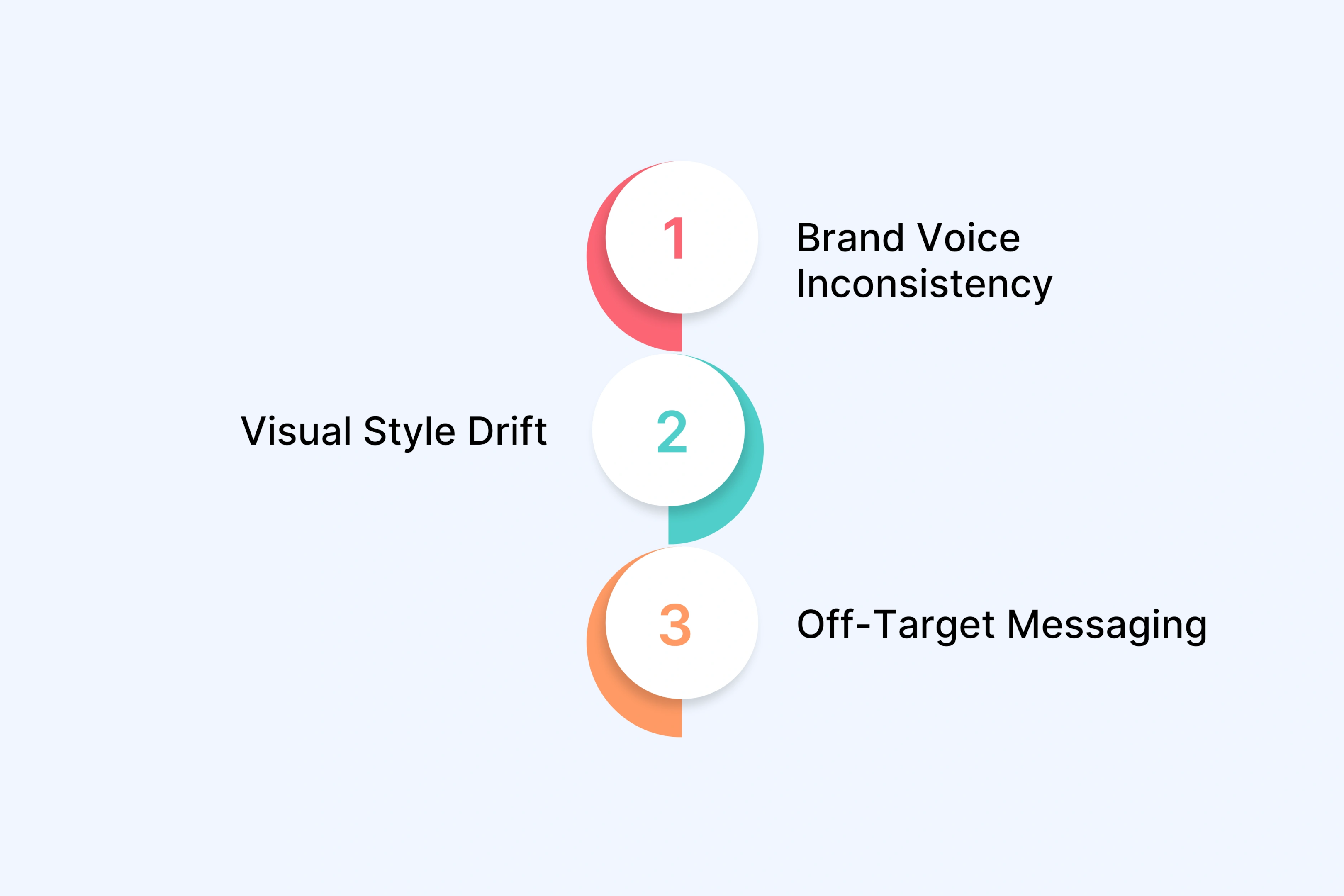
This concern is real. Here are the most common places where creative control slips:
Brand voice inconsistency – The tone feels off or does not match your messaging guidelines.
Visual style drift – Colors, fonts, or layouts do not align with your brand identity.
Off-target messaging – The video content misses the mark with your target audience.
Video carries higher stakes than blog posts or social images. Your video content appears across multiple platforms. It shapes brand perception in seconds. A single off-brand video can confuse customers or damage trust.
The challenge is not the AI tools themselves. The challenge is how you use them. Without clear creative direction and human oversight, even advanced AI algorithms cannot deliver what your brand needs.
Where Creative Control Actually Lives in Video Production
Creative control does not live in your video editing software. It lives in four specific decision points that shape every video you create.
Concept and strategy – What message do you want to send and why does it matter to viewers?
Script and narrative – How will you tell the story and what tone will you use?
Visual execution – What will viewers see, hear, and feel while watching?
Final review – Does the finished video match your creative vision and quality standards?
These decision points matter more than which AI video generator or video editing tool you choose. Traditional video production has the same hand-off risks. Agencies can miss your brief. Freelancers can interpret your brand guidelines differently. This is not just an AI problem.
The Concept and Strategy Layer
This is where your creative direction gets defined. Before any production work begins, you need clarity on:
Your campaign goals and success metrics
Your target audience and what motivates them
Your brand's voice and visual style requirements
The specific message each video needs to deliver
This layer sets the foundation. Skip it and even the best AI powered tools will produce content that misses the mark.
The Execution Layer
This is where video production happens. AI video editing tools, generative AI, and video generators come into play here. But they work best when guided by the strategy layer above.
The execution layer includes:
Script writing and narrative structure
Avatar selection for AI spokesperson video services
Background music and sound effects
Visual composition and brand consistency
With clear creative direction, AI can handle repetitive tasks like creating multiple versions or generating subtitles. Without that direction, you get generic output that needs extensive manual work to fix.
The Co-Creation Model: How to Use AI Without Losing Your Voice
Co-creation means humans set direction, AI handles execution, and humans refine the output. You are not choosing between full control or full automation. You are designing a video production workflow that protects creative integrity while using AI to enhance efficiency.
This model works because it puts human creativity at the decision points that matter most. AI driven tools handle time consuming tasks like rendering, generating subtitles in multiple languages, or creating multiple versions of the same video. Your creative teams focus on strategic thinking and maintaining your unique brand voice.
Real example: A D2C brand needed 10 UGC-style product demos with consistent quality across all videos. They provided creative direction upfront. A creative partner used generative AI tools to produce professional looking videos in days instead of weeks. The brand reviewed each version, gave feedback, and approved the final video for each variant. Result: High quality output without sacrificing quality or creative freedom.
Input That Shapes Output
Creative direction is not vague. It needs documentation. Here is what shapes your AI generated content:
Brand guidelines with tone, color palette, and visual style requirements
Visual references like concept art or existing videos that match your vision
Audio preferences including background music style and whether you want sound effects
Platform specifications for different platforms like Instagram, YouTube, or explainer videos
The more specific your input, the better your output. This documentation gives you fine grained control without doing extensive manual work on every frame.
Review Loops That Catch Drift Early
Iteration protects your creative expression. Build feedback cycles into your video production workflows:
First review after script and storyboard approval
Second review after initial video generation
Final review with automated quality checks for background noise or visual inconsistencies
This is not just approve or reject. Your human editor catches issues early before you scale production. Feedback at each stage means your final videos stay visually appealing and on brand across global audiences.
What Makes AI Video Production Controllable (And What Doesn't)
Not all AI video tools work the same way. Some require technical skills like screen recording or post production expertise. Others just need clear creative direction and an intuitive interface.
The best generative AI tools let you iterate. You can adjust the creative process, test different approaches, and refine the final video. Black box tools generate content without showing how they work or letting you change specific elements.
Red flags to watch for:
Automation removes your ability to give feedback at key stages
No way to maintain brand consistency across video content
Limited control over visual style or audio content creation
You cannot create multiple versions for testing
Green flags that signal control:
AI handles repetitive tasks like video generation or adding subtitles
You approve creative direction before production starts
Review loops let you catch issues and request changes
Platform helps you save time without sacrificing quality or creative possibilities
Common Pitfalls (And How to Avoid Them)
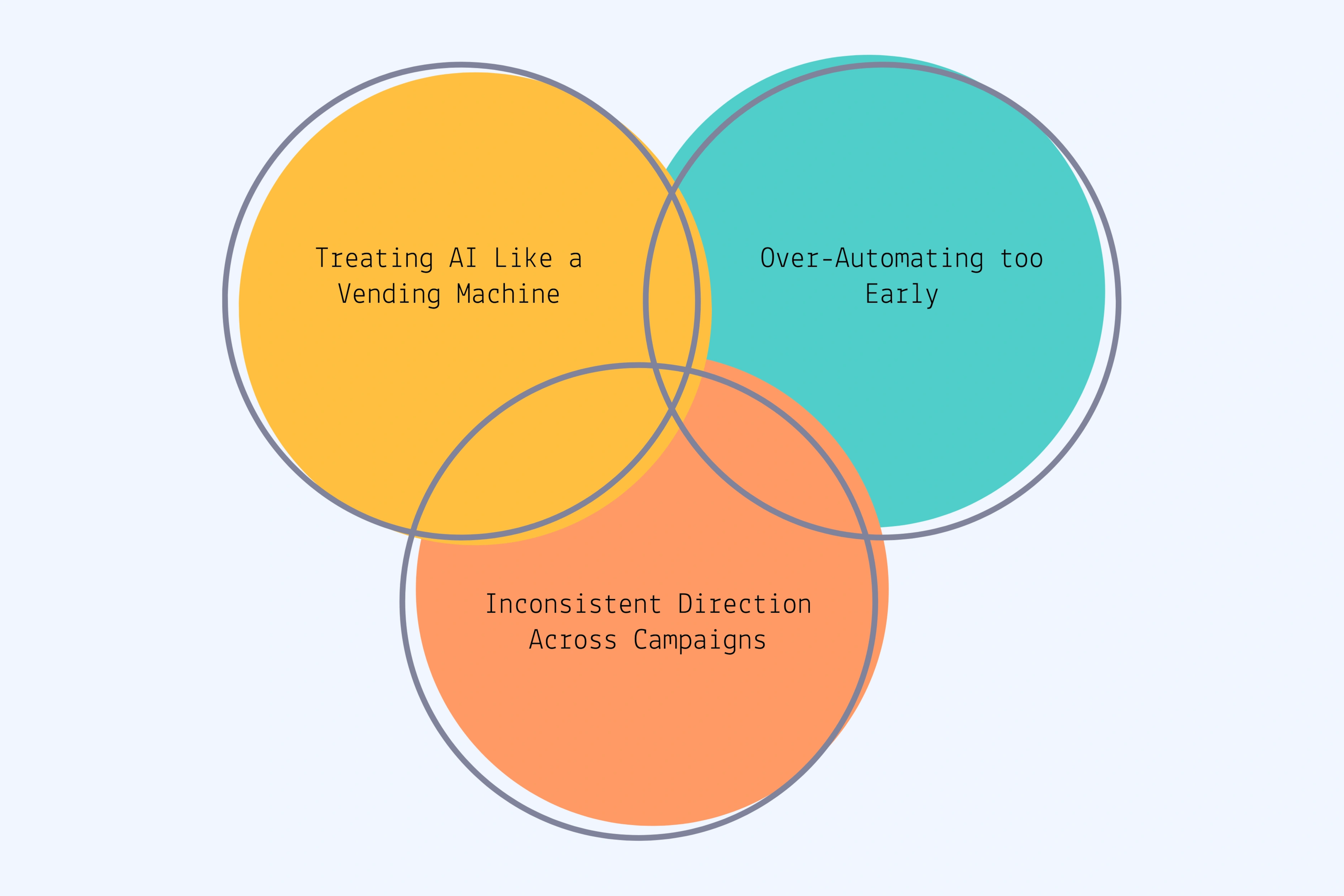
Teams make predictable mistakes when leveraging AI for the first time. These errors hurt video quality and waste the time you hoped to save.
Pitfall 1: Treating AI like a vending machine
You cannot input a prompt and expect perfect high quality videos. AI video editing tools need context. They work best when you provide brand guidelines, visual references, and clear goals. Think of AI as a partner in your creative practice, not a magic button.
Pitfall 2: Over-automating too early
Removing human creativity from the process kills what makes your content unique. AI tools should enhance efficiency on repetitive work like post production or creating versions for different platforms. But strategic decisions still need human oversight. The turning point is finding which tasks to automate and which need your creative input.
Pitfall 3: Inconsistent direction across campaigns
When different team members give different instructions, you get inconsistent output. Your video editors and marketing teams need shared documentation.
How to prevent these issues:
Document your creative direction in writing before using any AI tools
Build approval gates at key stages of production
Create reusable asset libraries for brand safe elements
Test your workflow on small projects before scaling to create content at volume
This structure helps you simplify video production while protecting the new creative possibilities that artificial intelligence offers. You get engaging videos that reflect your brand, not generic output.
Why a Creative Partner Approach Helps (Not a Tool-First One)
Self-service AI tools put all the work on your team. You still handle strategy, creative direction, quality checks, and video editing. The platform gives you access, but you do everything else alone.
A creative partner works differently. You get consultative input and expert recommendations throughout the creative process. Instead of a platform login, you receive finished videos that match your brand standards.
Strategic guidance on what types of engaging videos work for your goals
End-to-end production from concept to final delivery
Quality control handled by experienced video editors
Expert knowledge of how artificial intelligence and machine learning work in production
Why this matters when scaling:
You can maintain quality without hiring more people. When you need 50 video variants for A/B testing, control is not just about one video. It is about systematic consistency across all versions.
A partner approach means you save time on execution while staying involved in the decisions that matter. You approve direction, review output, and give feedback. But you do not manage the production details or learn complex AI tools.
This model keeps your creative process intact while letting you scale faster than your team could alone.
Building Your Own Control Framework
You need a system before you start any video project. A control framework gives you repeatable quality across all your content.
Brand guidelines including colors, fonts, logos, and visual style
Approval process with clear decision makers at each stage
Success metrics so you know what good performance looks like
Budget and timeline expectations for realistic planning
Document your creative direction:
Create written guides that anyone on your team can follow. Include tone examples that show your brand voice in action. Add visual style references from existing videos or campaigns you admire. List specific do's and don'ts for messaging, imagery, and audio choices.
This documentation protects your brand consistency when you scale production or work with external partners.
Test before you scale:
Start with one or two videos. Learn what works for your target audience and what needs adjustment. Gather feedback from your team and viewers. Refine your process based on real results.
Once you have confidence in your workflow, scale up production. Your documented framework means you can create multiple versions without losing quality or creative control.
This approach works whether you use AI tools internally or partner with a creative team for video production at scale.
Frequently Asked Questions
Can AI video tools maintain brand consistency across multiple videos?
Yes, when you provide clear creative direction and use review workflows. Document your brand guidelines, visual style, and tone requirements. Build reusable asset libraries with approved fonts, colors, and logos. Review each video before approval to catch any drift. This approach maintains consistent quality whether you produce 5 videos or 50 variants for different platforms.
Do I need technical skills to maintain creative control with AI video production?
No. You need clear creative direction, not coding skills. The challenge is communication, not technology. Define your target audience, message, visual style, and goals in simple terms. Good AI video generators can translate your direction into finished videos. Focus on strategic thinking and approvals, not learning complex video editing software.
How much human oversight is needed in AI video production?
Focus on strategic decision points: concept, script approval, and final review. You do not need to edit every frame manually. AI handles repetitive tasks like generating subtitles or creating multiple versions. Your job is setting creative direction upfront and verifying quality at key checkpoints. This balance lets you save time while maintaining creative integrity.
What's the difference between AI video generators and working with a creative partner?
Generators are self-service tools where you handle everything: strategy, creative direction, and quality control. Creative partners provide strategic guidance plus execution. They deliver finished video content with expert recommendations throughout the process. Generators work when you have in-house video editors and time. Partners help you scale content production without expanding your team.
How do I prevent AI-generated videos from looking generic?
Provide specific creative direction, not vague prompts. Build brand asset libraries with approved fonts, colors, and visual references. Share examples of existing videos that match your style. Use feedback loops to request changes before finalizing content. Document your brand voice do's and don'ts. Generic videos happen when AI lacks guidance, not because of the technology.
Can AI handle complex brand storytelling or just simple video ads?
AI supports various content types with proper guidance. Simple formats like product demos and explainer videos work well with clear direction. Complex brand storytelling needs more human creativity at the concept and scripting stages. AI still helps with execution, multiple versions, and adapting content for global audiences. Match your human involvement level to your creative vision's complexity.
What This Means for Teams Trying to Scale Video Content
The question has shifted. You are not asking "can we use AI?" anymore. You are asking "how do we use it well?"
Creative control is not about doing everything manually. It is about being intentional at the right decision points: strategy, scripting, review, and approval. When you produce video content at scale, your goal is systematic quality, not one-off perfection.
The right approach combines human creativity with AI efficiency. No compromise needed.
If you are exploring how to maintain brand quality while scaling video production, a collaborative approach might be worth considering. Book your strategy call now to discuss how a creative partner can help you scale without losing control.
Let's Turn Your Scripts into Stunning Videos. Sign Up Now.
Stop struggling with video creation. Our AI simplifies the process, letting you create professional-looking videos from text in record time. Try it for free today!
AI video tools can speed up your production. But many marketing teams worry about losing their brand voice in the process. You want faster content creation without generic output or off-brand messaging. The good news? Creative control and AI efficiency are not opposites.
You can maintain quality standards while scaling video production. The key is understanding where control actually matters in the workflow and how to structure your process around those decision points.
This guide shows you exactly where creative control lives, what co-creation looks like in practice, and how to avoid the most common mistakes teams make.
Key Takeaways
Control Points Matter: Creative control lives in four places: strategy, scripting, execution, and review. Focus your attention on these decision points, not the tools themselves.
Co-Creation Works Best: Humans set direction, AI handles production, humans refine the output. This workflow maintains quality while speeding up delivery.
Documentation Drives Consistency: Brand guidelines, visual references, and tone documentation give you repeatable control across all videos. Write down your creative direction.
Review Loops Prevent Drift: Build feedback cycles into your workflow. Catch issues early with approval gates before scaling production.
Partnership Beats Tools: Self-service platforms leave strategic work to you. A creative partner provides guidance, recommendations, and finished videos.
Test Multiple Versions: Create several video variants for A/B testing. Learn what resonates with your audience before committing to one approach.
Why Creative Control Feels at Risk with AI Video Tools
AI video generators promise faster production. But that speed creates worry. You fear the output will look generic or miss your brand voice.
This concern is real. Here are the most common places where creative control slips:
Brand voice inconsistency – The tone feels off or does not match your messaging guidelines.
Visual style drift – Colors, fonts, or layouts do not align with your brand identity.
Off-target messaging – The video content misses the mark with your target audience.
Video carries higher stakes than blog posts or social images. Your video content appears across multiple platforms. It shapes brand perception in seconds. A single off-brand video can confuse customers or damage trust.
The challenge is not the AI tools themselves. The challenge is how you use them. Without clear creative direction and human oversight, even advanced AI algorithms cannot deliver what your brand needs.
Where Creative Control Actually Lives in Video Production
Creative control does not live in your video editing software. It lives in four specific decision points that shape every video you create.
Concept and strategy – What message do you want to send and why does it matter to viewers?
Script and narrative – How will you tell the story and what tone will you use?
Visual execution – What will viewers see, hear, and feel while watching?
Final review – Does the finished video match your creative vision and quality standards?
These decision points matter more than which AI video generator or video editing tool you choose. Traditional video production has the same hand-off risks. Agencies can miss your brief. Freelancers can interpret your brand guidelines differently. This is not just an AI problem.
The Concept and Strategy Layer
This is where your creative direction gets defined. Before any production work begins, you need clarity on:
Your campaign goals and success metrics
Your target audience and what motivates them
Your brand's voice and visual style requirements
The specific message each video needs to deliver
This layer sets the foundation. Skip it and even the best AI powered tools will produce content that misses the mark.
The Execution Layer
This is where video production happens. AI video editing tools, generative AI, and video generators come into play here. But they work best when guided by the strategy layer above.
The execution layer includes:
Script writing and narrative structure
Avatar selection for AI spokesperson video services
Background music and sound effects
Visual composition and brand consistency
With clear creative direction, AI can handle repetitive tasks like creating multiple versions or generating subtitles. Without that direction, you get generic output that needs extensive manual work to fix.
The Co-Creation Model: How to Use AI Without Losing Your Voice
Co-creation means humans set direction, AI handles execution, and humans refine the output. You are not choosing between full control or full automation. You are designing a video production workflow that protects creative integrity while using AI to enhance efficiency.
This model works because it puts human creativity at the decision points that matter most. AI driven tools handle time consuming tasks like rendering, generating subtitles in multiple languages, or creating multiple versions of the same video. Your creative teams focus on strategic thinking and maintaining your unique brand voice.
Real example: A D2C brand needed 10 UGC-style product demos with consistent quality across all videos. They provided creative direction upfront. A creative partner used generative AI tools to produce professional looking videos in days instead of weeks. The brand reviewed each version, gave feedback, and approved the final video for each variant. Result: High quality output without sacrificing quality or creative freedom.
Input That Shapes Output
Creative direction is not vague. It needs documentation. Here is what shapes your AI generated content:
Brand guidelines with tone, color palette, and visual style requirements
Visual references like concept art or existing videos that match your vision
Audio preferences including background music style and whether you want sound effects
Platform specifications for different platforms like Instagram, YouTube, or explainer videos
The more specific your input, the better your output. This documentation gives you fine grained control without doing extensive manual work on every frame.
Review Loops That Catch Drift Early
Iteration protects your creative expression. Build feedback cycles into your video production workflows:
First review after script and storyboard approval
Second review after initial video generation
Final review with automated quality checks for background noise or visual inconsistencies
This is not just approve or reject. Your human editor catches issues early before you scale production. Feedback at each stage means your final videos stay visually appealing and on brand across global audiences.
What Makes AI Video Production Controllable (And What Doesn't)
Not all AI video tools work the same way. Some require technical skills like screen recording or post production expertise. Others just need clear creative direction and an intuitive interface.
The best generative AI tools let you iterate. You can adjust the creative process, test different approaches, and refine the final video. Black box tools generate content without showing how they work or letting you change specific elements.
Red flags to watch for:
Automation removes your ability to give feedback at key stages
No way to maintain brand consistency across video content
Limited control over visual style or audio content creation
You cannot create multiple versions for testing
Green flags that signal control:
AI handles repetitive tasks like video generation or adding subtitles
You approve creative direction before production starts
Review loops let you catch issues and request changes
Platform helps you save time without sacrificing quality or creative possibilities
Common Pitfalls (And How to Avoid Them)
Teams make predictable mistakes when leveraging AI for the first time. These errors hurt video quality and waste the time you hoped to save.
Pitfall 1: Treating AI like a vending machine
You cannot input a prompt and expect perfect high quality videos. AI video editing tools need context. They work best when you provide brand guidelines, visual references, and clear goals. Think of AI as a partner in your creative practice, not a magic button.
Pitfall 2: Over-automating too early
Removing human creativity from the process kills what makes your content unique. AI tools should enhance efficiency on repetitive work like post production or creating versions for different platforms. But strategic decisions still need human oversight. The turning point is finding which tasks to automate and which need your creative input.
Pitfall 3: Inconsistent direction across campaigns
When different team members give different instructions, you get inconsistent output. Your video editors and marketing teams need shared documentation.
How to prevent these issues:
Document your creative direction in writing before using any AI tools
Build approval gates at key stages of production
Create reusable asset libraries for brand safe elements
Test your workflow on small projects before scaling to create content at volume
This structure helps you simplify video production while protecting the new creative possibilities that artificial intelligence offers. You get engaging videos that reflect your brand, not generic output.
Why a Creative Partner Approach Helps (Not a Tool-First One)
Self-service AI tools put all the work on your team. You still handle strategy, creative direction, quality checks, and video editing. The platform gives you access, but you do everything else alone.
A creative partner works differently. You get consultative input and expert recommendations throughout the creative process. Instead of a platform login, you receive finished videos that match your brand standards.
Strategic guidance on what types of engaging videos work for your goals
End-to-end production from concept to final delivery
Quality control handled by experienced video editors
Expert knowledge of how artificial intelligence and machine learning work in production
Why this matters when scaling:
You can maintain quality without hiring more people. When you need 50 video variants for A/B testing, control is not just about one video. It is about systematic consistency across all versions.
A partner approach means you save time on execution while staying involved in the decisions that matter. You approve direction, review output, and give feedback. But you do not manage the production details or learn complex AI tools.
This model keeps your creative process intact while letting you scale faster than your team could alone.
Building Your Own Control Framework
You need a system before you start any video project. A control framework gives you repeatable quality across all your content.
Brand guidelines including colors, fonts, logos, and visual style
Approval process with clear decision makers at each stage
Success metrics so you know what good performance looks like
Budget and timeline expectations for realistic planning
Document your creative direction:
Create written guides that anyone on your team can follow. Include tone examples that show your brand voice in action. Add visual style references from existing videos or campaigns you admire. List specific do's and don'ts for messaging, imagery, and audio choices.
This documentation protects your brand consistency when you scale production or work with external partners.
Test before you scale:
Start with one or two videos. Learn what works for your target audience and what needs adjustment. Gather feedback from your team and viewers. Refine your process based on real results.
Once you have confidence in your workflow, scale up production. Your documented framework means you can create multiple versions without losing quality or creative control.
This approach works whether you use AI tools internally or partner with a creative team for video production at scale.
Frequently Asked Questions
Can AI video tools maintain brand consistency across multiple videos?
Yes, when you provide clear creative direction and use review workflows. Document your brand guidelines, visual style, and tone requirements. Build reusable asset libraries with approved fonts, colors, and logos. Review each video before approval to catch any drift. This approach maintains consistent quality whether you produce 5 videos or 50 variants for different platforms.
Do I need technical skills to maintain creative control with AI video production?
No. You need clear creative direction, not coding skills. The challenge is communication, not technology. Define your target audience, message, visual style, and goals in simple terms. Good AI video generators can translate your direction into finished videos. Focus on strategic thinking and approvals, not learning complex video editing software.
How much human oversight is needed in AI video production?
Focus on strategic decision points: concept, script approval, and final review. You do not need to edit every frame manually. AI handles repetitive tasks like generating subtitles or creating multiple versions. Your job is setting creative direction upfront and verifying quality at key checkpoints. This balance lets you save time while maintaining creative integrity.
What's the difference between AI video generators and working with a creative partner?
Generators are self-service tools where you handle everything: strategy, creative direction, and quality control. Creative partners provide strategic guidance plus execution. They deliver finished video content with expert recommendations throughout the process. Generators work when you have in-house video editors and time. Partners help you scale content production without expanding your team.
How do I prevent AI-generated videos from looking generic?
Provide specific creative direction, not vague prompts. Build brand asset libraries with approved fonts, colors, and visual references. Share examples of existing videos that match your style. Use feedback loops to request changes before finalizing content. Document your brand voice do's and don'ts. Generic videos happen when AI lacks guidance, not because of the technology.
Can AI handle complex brand storytelling or just simple video ads?
AI supports various content types with proper guidance. Simple formats like product demos and explainer videos work well with clear direction. Complex brand storytelling needs more human creativity at the concept and scripting stages. AI still helps with execution, multiple versions, and adapting content for global audiences. Match your human involvement level to your creative vision's complexity.
What This Means for Teams Trying to Scale Video Content
The question has shifted. You are not asking "can we use AI?" anymore. You are asking "how do we use it well?"
Creative control is not about doing everything manually. It is about being intentional at the right decision points: strategy, scripting, review, and approval. When you produce video content at scale, your goal is systematic quality, not one-off perfection.
The right approach combines human creativity with AI efficiency. No compromise needed.
If you are exploring how to maintain brand quality while scaling video production, a collaborative approach might be worth considering. Book your strategy call now to discuss how a creative partner can help you scale without losing control.
We are committed to safety, security, and ethical use of our service. Al avatars can only be created and shared with express consent and cannot be used to spread content that's harmful to others.
December 23, 2025
How to Scale Video Ad Production Without the Traditional Bottlenecks
Learn how teams produce 20-30 video ad variations per campaign without massive budgets. Practical strategies for scaling video production that actually work.
Short-Form Video Ads: Why Most Fail in 7 Days (And How to Win)
Most short-form video ads lose 50% performance in 7 days. Learn the attention patterns, variation strategies, and platform tactics that sustain results.
How to Scale UGC Video Ads Without Losing Authenticity (or Your Budget)
UGC video ads drive conversions, but scaling them is expensive and slow. Learn how brands test multiple hooks, maintain authenticity, and reduce ad spend without creator dependency.
Avatar Marketing: Which One Do You Actually Need? (And How to Know)
Avatar marketing can mean digital AI characters OR customer profiling. Learn which one you need, when each works, and how to avoid costly mistakes in your strategy.
We are committed to safety, security, and ethical use of our service. Al avatars can only be created and shared with express consent and cannot be used to spread content that's harmful to others.
Data Encryption
Your data is encrypted both in transit and at rest, ensuring safe and confidential communications at all times.
Privacy Compliance
Our platform adheres to GDPR, CCPA, and SOC 2, safeguarding your data with strict security protocols.
Identity Verification
We use identity checks to ensure only authorized individuals access your account and data.
24/7 Monitoring
Our system continuously monitors for vulnerabilities, keeping your data safe from potential risks.









.svg)
.svg)
%201.svg)

.webp)
.webp)
.webp)


.svg)
